

Latest Version
Download NowMore About Epson Stylus NX230 Adjustment Program
Epson Stylus NX230 Adjustment Program: A Comprehensive Guide
The Epson Stylus NX230 is a compact, all-in-one inkjet printer designed for home and small office use. While it is reliable for printing, scanning, and copying tasks, occasional issues may arise that require resetting or adjusting the printer’s internal settings. One effective solution for these problems is the Epson Stylus NX230 Adjustment Program.
What is the Epson Stylus NX230 Adjustment Program?
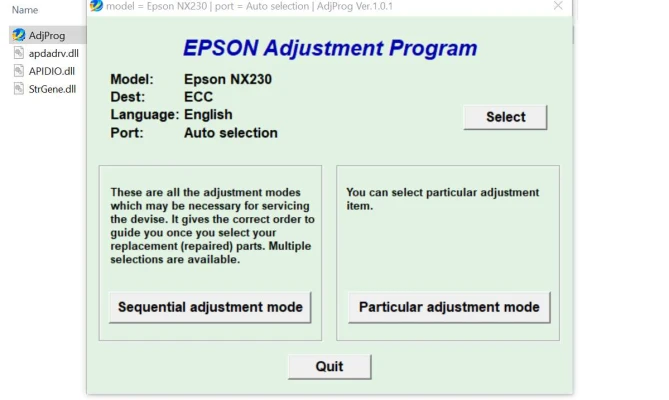
The Epson Stylus NX230 Adjustment Program is a specialized tool used to reset or reconfigure various functions within the printer. It is particularly helpful when your printer encounters problems such as a waste ink pad reaching its limit, issues with printhead alignment, or even when performing routine maintenance tasks like cleaning or resetting the printer.
The Adjustment Program allows you to fix common issues without needing to consult technical support or service centers. It directly interacts with the printer’s firmware and system, giving users control over functions that would typically require professional repair.
Key Features of the Adjustment Program
-
Resetting Waste Ink Counters: One of the most common reasons for using the Adjustment Program is to reset the waste ink counter. Over time, your printer’s waste ink pad fills up, which triggers an error. The program allows you to reset this counter, effectively stopping the error from preventing your printer from working.
-
Printhead Alignment: Sometimes, the printhead may need realignment to ensure print quality. The Adjustment Program can assist in restoring optimal performance by adjusting the alignment settings, which is crucial for improving the print quality of documents and images.
-
Cleaning the Printhead: If you notice faded or inconsistent prints, the Adjustment Program can trigger the cleaning process, ensuring that your printhead remains clear and free from clogs. This feature can help extend the life of your printer.
-
Ink System Reset: After replacing ink cartridges, some printers may still show low ink warnings. The Epson Stylus NX230 Adjustment Program helps reset ink counters, which eliminates such errors, allowing the printer to correctly detect the new ink levels.
-
Restoring Printer Settings: In cases where the printer’s settings get corrupted or need resetting, this program can return the printer to its default configuration, improving stability and functionality.
How to Use the Epson Stylus NX230 Adjustment Program
-
Download the Program: The first step is to download the Epson Stylus NX230 Adjustment Program from a reliable source. Ensure you choose a website that offers secure downloads to avoid malware or unwanted software.
-
Install the Program: Once downloaded, install the program on your computer. The installation process is typically straightforward, but it may require administrator permissions for some system changes.
-
Connect the Printer: Ensure that your Epson Stylus NX230 is properly connected to your computer via USB or network connection.
-
Run the Program: Open the Adjustment Program. You will be prompted to select your printer model from the list, and once selected, you can access the various functions available.
-
Perform Desired Actions: Choose the specific function you wish to perform. For instance, if you need to reset the waste ink counter, simply follow the prompts. If you want to clean the printhead, the program will guide you through the necessary steps.
-
Finalize: After completing the desired actions, close the program and restart your printer. The adjustments should now be in effect.
Precautions When Using the Adjustment Program
While the Epson Stylus NX230 Adjustment Program is a powerful tool, there are a few precautions to keep in mind:
- Use with Caution: Make sure to only use the program for its intended purpose. Incorrect use can result in problems that might require professional assistance.
- Backup Settings: Before making any changes, consider backing up your printer settings or configurations.
- Do Not Overuse Cleaning Functions: Excessive printhead cleaning can waste ink and potentially damage the printhead. Use this feature sparingly.
- Waste Ink Pads: Resetting the waste ink counter without actually replacing or servicing the waste ink pads can lead to ink leakage or permanent damage over time.
Conclusion
The Epson Stylus NX230 Adjustment Program is a valuable tool for anyone who owns this printer and wants to resolve maintenance-related issues without sending the device for repairs. By allowing you to reset key functions, realign printheads, and manage ink counters, the program helps ensure the longevity and performance of your printer. However, it’s important to use the tool responsibly and understand its limitations. With proper care, the Epson Stylus NX230 can continue to provide high-quality prints for years to come.
Rate the App
User Reviews


Popular Apps








