

Latest Version
Download NowMore About Epson Stylus NX127 Adjustment Program
Epson Stylus NX127 Adjustment Program: A Comprehensive Guide
The Epson Stylus NX127 is a popular all-in-one inkjet printer that combines printing, scanning, and copying capabilities into a compact and efficient design. However, like all printers, over time, it may experience performance issues, including alignment problems, print quality degradation, or error messages that indicate it needs an adjustment or reset. This is where the Epson Stylus NX127 Adjustment Program comes into play.
What is the Epson Stylus NX127 Adjustment Program?
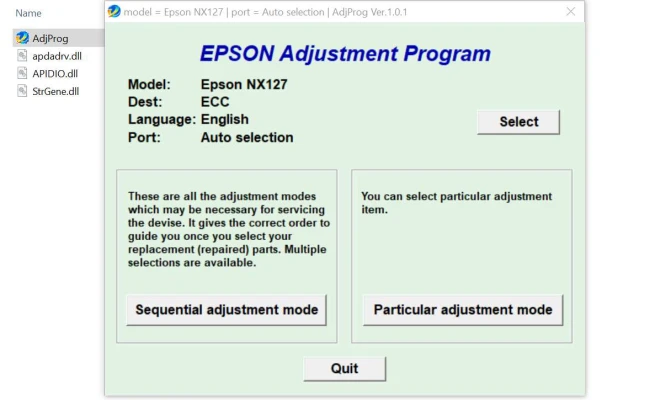
The Epson Stylus NX127 Adjustment Program is a software utility designed to help users reset or adjust various functions of the printer to restore its optimal performance. It provides a set of tools that allow users to reset counters, adjust printhead alignment, clear error codes, and perform other maintenance tasks that can prolong the life of the printer.
This program is typically used when the printer has problems that can't be resolved with basic troubleshooting steps, such as printing poor quality documents or facing repeated error codes. It is important to note that this program is primarily for advanced users who are familiar with printer settings and maintenance procedures.
Key Features of the Epson Stylus NX127 Adjustment Program
-
Waste Ink Counter Reset: One of the most common issues with inkjet printers like the NX127 is the waste ink counter, which tracks how much ink has been absorbed by the printer during printing processes. Over time, the waste ink pad can fill up, triggering an error code. The Adjustment Program allows you to reset this counter and clear any warnings related to waste ink.
-
Print Head Alignment: Misalignment of the printhead can lead to poor print quality, including blurry or uneven text and images. The Adjustment Program can recalibrate the printhead to ensure accurate printing.
-
Cleaning and Maintenance: The software provides various cleaning options, including head cleaning and nozzle check. These tools help maintain the printhead's performance and prevent ink clogging, ensuring high-quality prints.
-
Error Code Reset: If your Epson Stylus NX127 shows an error code that doesn't seem to go away after basic troubleshooting, the Adjustment Program can clear these errors. This is particularly helpful for users who may be stuck in a loop of error messages.
-
General Printer Settings: The program also allows for general adjustments to the printer's settings, such as ink density and print speed, giving you the ability to customize the printer to your specific needs.
How to Use the Epson Stylus NX127 Adjustment Program
Before you begin, make sure you have the necessary software and installation files. The Epson Stylus NX127 Adjustment Program is typically not available directly through Epson's official website, as it is intended for service technicians and advanced users. However, you can find trusted third-party websites offering the program for download.
Here’s a step-by-step guide on how to use the Adjustment Program:
-
Download and Install the Program: Ensure you are downloading the correct version of the program compatible with your operating system (Windows or macOS). Install the program by following the on-screen instructions.
-
Connect Your Printer: Ensure your Epson Stylus NX127 is properly connected to your computer via USB or network connection. Make sure the printer is turned on and ready for use.
-
Launch the Adjustment Program: Open the software. You may be prompted to select your printer model from a list of supported devices.
-
Select the Adjustment Function: Choose the function you wish to adjust. This could include resetting the waste ink counter, aligning the printhead, or cleaning the printhead.
-
Follow On-Screen Instructions: The program will guide you through the process, providing prompts and steps to follow. Be sure to read the instructions carefully to avoid any mistakes that could potentially cause damage to the printer.
-
Complete the Reset/Adjustment: Once the adjustment or reset is complete, the program will confirm the action. You may need to restart the printer or perform a test print to ensure the changes have taken effect.
Troubleshooting Common Issues
While the Epson Stylus NX127 Adjustment Program can be a useful tool, there may still be times when issues persist. Here are a few troubleshooting tips:
- Printer Not Recognized: Ensure that the printer is correctly connected to the computer and powered on. Check for any loose cables or network connection issues.
- Error Codes Persist: If resetting the waste ink counter or error codes doesn't resolve the issue, there may be a hardware problem that requires professional repair.
- Program Not Installing: If the Adjustment Program fails to install, check if your antivirus or firewall settings are blocking the installation. You may need to temporarily disable these protections.
Conclusion
The Epson Stylus NX127 Adjustment Program is a powerful tool that can help extend the life of your printer by allowing you to perform necessary resets and adjustments. Whether you're dealing with error codes, poor print quality, or waste ink counter issues, this program provides a straightforward way to keep your printer in top shape. However, it’s important to use the program carefully, as improper adjustments can lead to further issues.
For users who prefer not to perform these tasks themselves, professional service may be the best option. Always ensure you're using trusted sources for downloading the Adjustment Program to avoid potential software issues.
Rate the App
User Reviews


Popular Apps








