

Latest Version
Download NowMore About Epson Stylus NX215 Adjustment Program
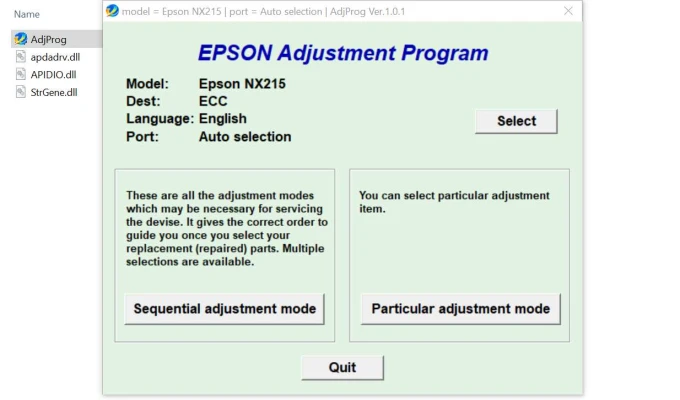
The Epson Stylus NX215 Adjustment Program is a valuable tool designed to help users of the Epson Stylus NX215 printer resolve common printing issues and maintain the printer’s optimal performance. This program allows you to reset the printer's internal counters, perform necessary adjustments, and carry out maintenance tasks, ensuring that the device continues to deliver high-quality prints.
What Is the Epson Stylus NX215 Adjustment Program?
The Epson Stylus NX215 Adjustment Program is a diagnostic and maintenance utility for the Epson Stylus NX215 all-in-one printer. It helps manage internal settings that can affect the printer’s performance over time, such as ink waste counters, print head alignment, and other factors that can degrade print quality or functionality. The tool is primarily used by technicians or advanced users to reset error codes, clear ink pads, and perform other maintenance tasks that are typically not accessible through the standard printer interface.
Why Is It Necessary?
Like most inkjet printers, the Epson Stylus NX215 can accumulate ink waste during normal printing operations. Over time, this waste can fill the printer’s internal ink pads, leading to error messages such as “Ink Pads are Full” or “Service Required.” The Adjustment Program allows you to reset the printer’s ink waste counter, thereby helping to extend the life of the printer and restore normal functionality.
Without access to this tool, users may find themselves stuck with error messages, and some printers might even stop printing until the issue is addressed. The adjustment program also provides options to reset the printer’s memory, clean the print heads, and perform other diagnostic procedures that help fix common printing issues like smudging or fading.
Features of the Epson Stylus NX215 Adjustment Program
-
Reset Ink Waste Counter: This feature allows users to reset the ink waste counter, which prevents errors related to full ink pads from interfering with the printer's operation.
-
Print Head Cleaning: Over time, ink can clog the print head, resulting in streaks or fading in prints. The Adjustment Program can initiate cleaning cycles to restore the print head’s functionality.
-
Print Head Alignment: This option ensures that the print head is properly aligned, improving print quality and preventing issues like misalignment or blurry prints.
-
Resetting the EEPROM (Electrically Erasable Programmable Read-Only Memory): This allows for a full reset of the printer’s internal memory, removing accumulated errors and restoring factory settings.
-
Deep Cleaning Option: A more thorough cleaning cycle to remove stubborn ink clogs from the print head.
How to Use the Epson Stylus NX215 Adjustment Program
-
Download the Program: The first step is to find a reliable source to download the Epson Stylus NX215 Adjustment Program. Note that this program is not officially distributed by Epson, and users should exercise caution to avoid downloading malicious software. Ensure that you are getting the program from a reputable source.
-
Install the Program: Once downloaded, the program typically needs to be installed on your computer. Ensure that the printer is connected to the computer and turned on before proceeding.
-
Run the Program: Open the program and select your Epson Stylus NX215 printer from the list of available devices. From here, you can choose the desired adjustment function, such as resetting the waste ink counter or performing a print head cleaning.
-
Follow On-Screen Instructions: Each adjustment option will come with a set of on-screen instructions. It’s important to follow these carefully to avoid making any unintended changes to the printer's settings.
-
Perform the Adjustment: After selecting the necessary option, initiate the adjustment. The printer will go through the steps automatically, and you may need to restart the printer afterward.
Benefits of Using the Epson Stylus NX215 Adjustment Program
-
Improved Print Quality: Regular maintenance, such as print head cleaning and alignment, helps maintain print quality, preventing issues like fading and streaks.
-
Cost-Effective: By resetting counters and performing maintenance yourself, you can avoid costly repairs and extend the printer's lifespan.
-
Ease of Use: While the program is not typically intended for casual users, it is relatively easy to use for those familiar with basic printer maintenance tasks.
-
Prevents Printer Failure: By resetting counters and performing deep cleaning, the program helps avoid situations where the printer might stop working due to internal errors or accumulated waste ink.
Conclusion
The Epson Stylus NX215 Adjustment Program is an essential tool for maintaining and troubleshooting your Epson printer. Whether you're dealing with an error code related to the ink waste counter or want to clean the print heads to improve print quality, this program provides the necessary functions to keep your printer running smoothly. While it’s generally more suited for advanced users, it can also be a valuable asset for those willing to perform some basic maintenance and avoid the cost of professional repairs.
As with any software, always ensure you're using a trusted source to download the program and follow the instructions carefully to avoid damaging your printer.
Rate the App
User Reviews


Popular Apps








