

Latest Version
Download NowMore About Epson Stylus NX110 Adjustment Program
Epson Stylus NX110 Adjustment Program: A Comprehensive Guide
The Epson Stylus NX110 is a versatile all-in-one inkjet printer known for its reliable performance, affordable price, and ease of use. However, like any printer, it may eventually encounter certain issues such as ink overflow, waste ink pad errors, or printing malfunctions. This is where the Epson Stylus NX110 Adjustment Program comes into play. In this article, we will explore what the adjustment program is, how it can help maintain your printer's functionality, and guide you through the steps to use it effectively.
What is the Epson Stylus NX110 Adjustment Program?
The Epson Stylus NX110 Adjustment Program is a tool that allows users to reset or adjust specific internal settings of their Epson printer. It's especially helpful for addressing issues related to the printer’s ink waste pads, which absorb excess ink during the printing process. Over time, these pads can become full, triggering a “waste ink pad error,” preventing the printer from functioning correctly.
The adjustment program also helps users manage other aspects of printer maintenance, such as resetting the page counter, cleaning the printhead, and addressing issues with ink cartridges and paper feeds. It's important to note that the Epson Adjustment Program is primarily designed for service technicians, but it is available for users who need to perform troubleshooting or adjustments at home.
Common Issues Fixed by the Adjustment Program
-
Waste Ink Pad Error: When the ink waste pads become full, the printer will stop working to avoid ink overflow. The adjustment program can reset the counter for these pads, allowing the printer to function again.
-
Resetting Page Counter: The printer may display errors related to the number of pages printed. Resetting the page counter can clear this error and restore the printer’s performance.
-
Print Head Cleaning: The adjustment program allows you to clean the printhead, which can help resolve issues such as ink smearing or faded prints.
-
Paper Feed Issues: Sometimes, paper feed problems can arise due to internal settings. The program allows for adjustments to fix these errors.
How to Use the Epson Stylus NX110 Adjustment Program
To use the Epson Stylus NX110 Adjustment Program, you’ll need to download and install the software on your computer. The program is available for both Windows and macOS, though it may require administrative access. Here are the steps to follow:
Step 1: Download the Adjustment Program
- Go to a trusted source to download the Epson Stylus NX110 Adjustment Program (ensure you are using a reliable website to avoid malware).
- Once downloaded, extract the files to a folder on your computer.
Step 2: Connect the Printer to Your Computer
- Ensure your Epson Stylus NX110 is connected to your computer via USB.
- Turn on the printer and make sure there are no active print jobs in the queue.
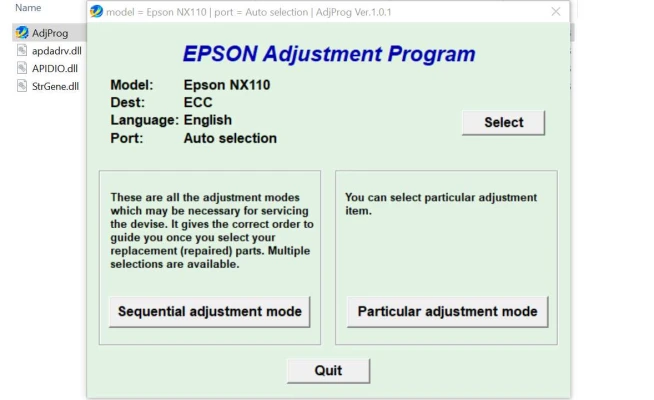
Step 3: Run the Adjustment Program
- Locate the adjustment program folder and double-click the application to open it.
- The program will prompt you to select the printer model. Choose Epson Stylus NX110 from the list.
- After selecting your printer, the program will display a list of options. Choose the appropriate function based on the issue you are facing, such as "Waste Ink Pad Counter Reset" or "Head Cleaning."
Step 4: Perform the Adjustment
- For Waste Ink Pad Reset, click on the relevant option and follow the on-screen instructions.
- If you’re resetting the page counter or cleaning the printhead, select the respective functions and click OK.
- Allow the program to complete the process. Do not disconnect the printer during the adjustment.
Step 5: Restart the Printer
After completing the necessary adjustments, restart your Epson Stylus NX110 to ensure that the changes take effect. The printer should now be free from the issues it was experiencing, such as the waste ink pad error or printhead problems.
Important Considerations
-
Use with Caution: The Epson Stylus NX110 Adjustment Program is a powerful tool. Incorrect use could potentially cause more harm than good, especially if you reset settings that you are unsure about. Always follow the instructions carefully.
-
Software Availability: The Adjustment Program is not officially provided by Epson for end-users, so it’s important to download it from a trusted third-party website. Make sure to scan the software for viruses before installation.
-
Waste Ink Pads: The adjustment program resets the counter for the waste ink pads but does not physically empty them. If the pads are full, you may need to replace them, which might require professional servicing.
Conclusion
The Epson Stylus NX110 Adjustment Program is an essential tool for users looking to resolve common printer issues, such as waste ink pad errors or printhead cleaning. By following the step-by-step instructions outlined above, you can maintain your printer's performance and extend its lifespan. However, always use the program responsibly and make sure to perform regular maintenance to avoid further complications. With proper care and occasional use of the adjustment program, your Epson Stylus NX110 can continue delivering excellent prints for years to come.
Rate the App
User Reviews


Popular Apps








