
Latest Version
Download NowMore About Epson L3150 Adjustment Program Reset Tool
Epson L3150 Adjustment Program Reset Tool: A Comprehensive Guide
The Epson L3150 is a versatile, reliable, and affordable inkjet printer known for its high-quality printing capabilities and low cost per page. However, like many printers, it may encounter issues over time that require troubleshooting and maintenance. One of the most common challenges with the Epson L3150 is the "Waste Ink Pad" error, which occurs when the printer’s internal waste ink pads become full. This problem can halt your printer's functionality, rendering it unusable unless addressed.
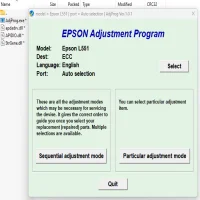
The Epson L3150 Adjustment Program Reset Tool is a solution specifically designed to help users reset the waste ink pad counter and perform other essential maintenance tasks to restore the printer to its original condition. In this article, we’ll explore the importance of the adjustment program reset tool, how it works, and how to use it effectively.
What is the Epson L3150 Adjustment Program Reset Tool?
The Epson L3150 Adjustment Program is a specialized software tool used by technicians and advanced users to reset certain settings and perform maintenance functions on the printer. This tool can be used to reset the waste ink pad counter, clear the error messages associated with it, and allow the printer to continue printing.
Waste ink pads are responsible for absorbing excess ink during the printing process, such as ink spills, nozzle cleanings, and other maintenance actions. Over time, these pads fill up, and the printer detects when they reach their limit. When this happens, the printer will show an error indicating that the waste ink pads need to be replaced or reset. The adjustment program helps you bypass this limitation temporarily.
Why You Might Need the Adjustment Program Reset Tool
-
Waste Ink Pad Overflow: When the printer's waste ink pads are full, it will display an error message, halting the printing process. The adjustment program helps reset the waste ink pad counter, clearing the error and allowing you to continue printing without the need for immediate replacement of the pads.
-
Maintenance Functions: The adjustment program is not limited to just resetting the waste ink counter. It can also be used for other maintenance tasks, including head cleaning, printhead alignment, and ink level checking.
-
Cost-Effective Solution: Rather than taking the printer to a service center or replacing the printer, using the reset tool can help you save time and money, especially if the issue is related to the waste ink pads.
How to Use the Epson L3150 Adjustment Program Reset Tool
Before using the Epson L3150 Adjustment Program Reset Tool, it’s important to note that this program is not officially provided by Epson for general consumer use. It is intended for service technicians, and users need to download it from third-party websites. Always exercise caution when downloading software from unofficial sources, and ensure that you have a reliable antivirus program installed.
Here’s a step-by-step guide on how to use the adjustment program:
Step 1: Download and Install the Adjustment Program
- Find a trusted source: Search for a reputable website offering the Epson L3150 Adjustment Program reset tool.
- Download the program: Make sure the file is compatible with your computer’s operating system (Windows or macOS).
- Install the program: Follow the installation instructions provided with the tool to set it up on your computer.
Step 2: Connect the Printer to Your Computer
- Power on the printer: Ensure your Epson L3150 is connected to your computer via USB or Wi-Fi and powered on.
- Check the connection: Make sure the printer is properly recognized by the computer.
Step 3: Launch the Adjustment Program
- Open the program: Run the adjustment program you installed.
- Select the Epson L3150 model: Choose your printer model from the list of available devices in the program.
- Enter the Service Mode: You may be required to enter a service mode, which is a special mode used for advanced functions. The program will guide you through this process.
Step 4: Reset the Waste Ink Pad Counter
- Choose the reset option: Look for an option labeled "Waste Ink Pad Counter" or similar in the program.
- Click "Reset": Follow the on-screen prompts to reset the waste ink pad counter. Once the reset is complete, the printer will be able to resume normal operation.
Step 5: Test the Printer
- Run a test print: After the reset, try printing a document to ensure that the printer is functioning correctly.
- Monitor for Errors: Keep an eye on the printer to ensure that no further errors occur and that it operates smoothly.
Precautions When Using the Reset Tool
-
Temporary Solution: The adjustment program reset tool is a temporary fix. While it allows you to continue printing, the waste ink pads will eventually fill up again. It is essential to replace the pads at the appropriate time to avoid damaging the printer.
-
Use with Caution: Only use the adjustment program if you are confident in your ability to follow the instructions carefully. Incorrect use can cause issues with the printer’s performance.
-
Backup Your Data: Before performing any reset or adjustments, ensure that your important data is backed up in case anything goes wrong during the process.
-
Consider Professional Help: If you're unsure about using the adjustment program, it may be worth seeking assistance from a professional technician. This will help ensure that the reset is done correctly and that your printer continues to operate optimally.
Conclusion
The Epson L3150 Adjustment Program Reset Tool is an invaluable tool for users who encounter waste ink pad errors or need to perform basic maintenance tasks on their printers. By following the steps outlined in this guide, you can reset the waste ink pad counter and continue using your printer without having to worry about costly repairs or replacements. However, remember that this is a temporary solution, and regular maintenance of the printer’s waste ink pads is necessary for long-term functionality.
Always exercise caution when downloading third-party software and consider professional help if you are uncertain about using the adjustment program. With proper care and maintenance, your Epson L3150 can continue delivering high-quality prints for years to come.
Rate the App
User Reviews
Popular Apps








