
Latest Version
Download NowMore About Epson L810 Adjustment Program ( Resetter )
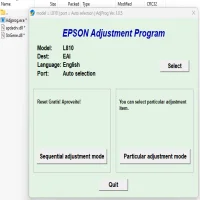
Epson L810 Adjustment Program (Resetter)
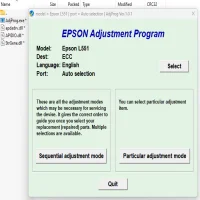
The Epson L810 is a popular photo printer known for its high-quality prints and cost-effective ink system. However, like any other printer, it can encounter errors or malfunctions over time. One of the most common issues with Epson printers is the "Waste Ink Pad" error, which can prevent your printer from functioning properly. Fortunately, the Epson L810 Adjustment Program (often referred to as the Resetter) is a useful tool that can help resolve these errors and restore your printer to its full functionality.
What is the Epson L810 Adjustment Program?
The Epson L810 Adjustment Program is a software tool designed to reset or adjust certain printer settings that may have been affected due to frequent use. It primarily addresses issues related to the waste ink pads, which are responsible for absorbing excess ink during the printing process. Over time, these pads can become saturated, leading to error messages and potentially halting the printer’s operations.
The adjustment program essentially resets the printer’s waste ink counter, allowing the printer to function as though the pads have been replaced, without needing to physically change them. This process helps to avoid costly repairs and interruptions in printing tasks.
Why Do You Need the Epson L810 Adjustment Program?
There are several reasons why you might need the Epson L810 Adjustment Program:
-
Waste Ink Pad Overflow Error: The most common issue that this program helps resolve is the waste ink pad overflow error. This error occurs when the ink pads absorb too much ink, reaching their limit, causing the printer to stop working.
-
Print Quality Issues: Sometimes, the adjustment program is used to recalibrate the printer's internal settings to improve print quality, especially if the printer has been in use for an extended period.
-
Resets and Adjustments: The software allows you to reset counters related to ink usage, preventing the printer from being locked due to high ink consumption. It also makes it possible to reset various internal parameters, which could be affecting performance.
-
Cost-Efficient Maintenance: Instead of taking your printer to a service center for repairs, using the adjustment program allows you to fix the issue on your own, saving time and money.
How Does the Epson L810 Adjustment Program Work?
The program works by connecting to the printer via USB and sending commands to reset certain internal parameters, such as the waste ink counter. Here’s how it typically works:
-
Download and Install the Software: The first step is to download the Epson L810 Adjustment Program from a reliable source. Make sure to use a trusted site, as some websites might provide outdated or malicious software. After downloading, install the software on your computer.
-
Connect the Printer: Next, connect the Epson L810 printer to your computer using a USB cable. Make sure the printer is powered on and ready to communicate with the software.
-
Run the Adjustment Program: Open the software and select the model of your printer (Epson L810). Follow the on-screen instructions carefully.
-
Perform the Reset: In the adjustment program, you will find a variety of options for resetting the waste ink pad counter and other settings. Typically, you would select the "Waste Ink Pad Counter Reset" option and follow the steps to reset the counter.
-
Check the Printer: After completing the reset process, restart the printer and check if the error message has been cleared. You should be able to continue printing without further issues.
Precautions When Using the Adjustment Program
While the Epson L810 Adjustment Program can be a lifesaver in fixing common printer problems, it’s important to exercise caution when using it:
-
Backup Your Printer Settings: Before resetting the printer, it’s a good idea to backup any important printer settings or configurations, as the process may reset certain preferences.
-
Follow Instructions Carefully: Be sure to follow the software’s instructions precisely. Incorrect use of the adjustment program can lead to further issues with the printer.
-
Check for Updates: Ensure that you are using the latest version of the adjustment program to avoid compatibility issues with your printer’s firmware.
-
Waste Ink Pads: Although resetting the counter can temporarily solve the problem, it’s important to eventually replace or clean the waste ink pads, as the issue may recur after extensive use.
-
Use at Your Own Risk: The use of the Epson L810 Adjustment Program is not officially supported by Epson. While it’s a widely used tool among technicians and advanced users, it can void your warranty or cause further damage if not used properly.
Conclusion
The Epson L810 Adjustment Program (Resetter) is a powerful tool for resolving issues like the waste ink pad overflow error and for performing other maintenance tasks on your Epson printer. By using this program, you can keep your printer running smoothly without having to pay for expensive repairs or service visits. However, always ensure you follow the instructions carefully and use the software responsibly to avoid potential issues.
In cases where resetting the printer doesn't resolve the problem, it may be necessary to replace the waste ink pads or seek professional assistance.
Rate the App
User Reviews

Popular Apps








