
Latest Version
Download NowMore About Epson L551 Adjustment Program ( Resetter )
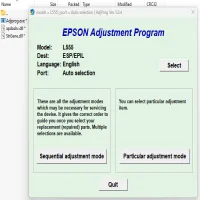
Epson L551 Adjustment Program (Resetter): A Comprehensive Guide
The Epson L551 is a popular multifunction inkjet printer, known for its cost-effectiveness, high-quality printing, and robust functionality. Like many Epson printers, the L551 has a built-in waste ink pad counter that helps track the printer's waste ink level. Over time, this counter can reach its limit, causing the printer to stop functioning. When this happens, users may encounter error messages such as “Service Required” or “Waste Ink Pad Full.”
Fortunately, there is a solution to this problem: the Epson L551 Adjustment Program, also known as the Epson Resetter. This software allows users to reset the waste ink pad counter, clearing the error and allowing the printer to continue operating. In this article, we'll delve into the Epson L551 Adjustment Program, how it works, and how to use it safely.
What is the Epson L551 Adjustment Program (Resetter)?
The Epson L551 Adjustment Program is a piece of software developed to help users perform specific maintenance tasks on their Epson printers. It enables the user to reset the waste ink pad counter and other settings, allowing the printer to function normally after encountering errors related to the waste ink pad. This program is sometimes referred to as a "resetter" because it essentially resets the printer's internal counter to zero, solving the issue without requiring physical intervention.
Why is the Epson L551 Adjustment Program Necessary?
Printers like the Epson L551 have a mechanism called the waste ink pad, which collects excess ink during printing, cleaning, and maintenance cycles. Over time, this waste ink pad becomes saturated. When the printer's internal counter detects that the waste ink pad is full, it triggers an error to prevent ink overflow, potentially damaging the printer.
The adjustment program allows you to reset this counter without having to replace the waste ink pad immediately. This is a temporary fix, though, as the waste ink pad will eventually need to be cleaned or replaced to maintain optimal printer performance.
Features of the Epson L551 Adjustment Program
-
Waste Ink Pad Counter Reset: The primary function of the resetter is to reset the waste ink pad counter. Once reset, the printer will no longer show the error message and can resume normal operations.
-
Printer Maintenance Functions: In addition to resetting the counter, the program may also allow users to perform basic maintenance tasks like nozzle checks, print head cleaning, and deep cleaning.
-
Full Functionality: The Epson L551 Adjustment Program provides full access to various printer functions, including ink level monitoring, head alignment, and print quality improvements.
-
Error Clearing: The resetter can clear error codes related to the waste ink pad, giving the printer a fresh start and preventing unnecessary downtime.
How to Use the Epson L551 Adjustment Program
Before you begin, it’s important to understand that the Epson L551 Adjustment Program is not officially provided by Epson, and using it may void your warranty. Always ensure you are using the correct version for your printer model and operating system. Here’s how you can use the program:
Step 1: Download the Epson L551 Adjustment Program
The Epson L551 Adjustment Program can typically be downloaded from third-party websites. Be cautious when downloading software, as not all sources are reliable or safe. Always choose a reputable site to ensure you’re getting the correct and safe software.
Step 2: Install the Adjustment Program
Once the program is downloaded, open the installer and follow the on-screen instructions to install the software on your computer. Make sure your printer is connected to your computer via USB or Wi-Fi during the installation.
Step 3: Run the Adjustment Program
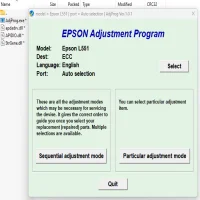
After installation, launch the program. You may be prompted to select your printer model from a list or to input specific printer details. Select the Epson L551 from the options.
Step 4: Select “Waste Ink Pad Counter” or “Reset Waste Ink Pad”
Look for the option labeled "Waste Ink Pad Counter" or something similar. This will allow you to reset the waste ink pad counter. Click on the button to initiate the reset process.
Step 5: Follow On-Screen Instructions
The program will guide you through the reset process. Follow the on-screen instructions carefully, as the steps can vary depending on the software version and your operating system. After the reset is completed, your printer should resume normal operation.
Step 6: Perform Printer Maintenance (Optional)
Once the reset is complete, you can use the program to perform additional maintenance tasks like head cleaning or alignment to ensure your printer is working at its best.
Cautions When Using the Epson L551 Adjustment Program
While the Epson L551 Adjustment Program can be very useful, there are some important precautions to consider:
-
Temporary Solution: Resetting the waste ink pad counter is a temporary solution. It’s essential to replace or clean the waste ink pad after several resets to prevent ink spillage and potential damage to the printer.
-
Warranty Concerns: Since the Adjustment Program is not officially authorized by Epson, using it may void your printer’s warranty. It’s advisable to check your warranty terms before proceeding.
-
Use Reliable Sources: Always ensure you download the program from a trustworthy website to avoid malware and security issues. Do not use cracked versions of the software.
-
Backup Your Data: Before resetting, make sure to backup any important documents in case of unexpected issues during the process.
Conclusion
The Epson L551 Adjustment Program is a powerful tool for users who encounter waste ink pad errors on their printers. It provides a convenient way to reset the waste ink pad counter and keep the printer operational. However, it should be used cautiously and as part of regular printer maintenance. Always ensure that you follow the steps carefully and consider replacing the waste ink pad when necessary to maintain the longevity and efficiency of your Epson L551 printer.
By using the Epson L551 Adjustment Program responsibly, you can extend the lifespan of your printer while avoiding costly repairs or replacements.
Rate the App
User Reviews

Popular Apps








