
Latest Version
Download NowMore About Epson L801 Adjustment Program ( Resetter )
Epson L801 Adjustment Program (Resetter): A Comprehensive Guide
The Epson L801 is a popular inkjet printer designed for high-quality photo printing, primarily used by photographers, small businesses, and print enthusiasts. While this printer offers exceptional performance, like all printers, it may eventually encounter issues such as ink waste or misalignments that require adjustment. The Epson L801 Adjustment Program (commonly known as the Epson L801 Resetter) is a software tool that can be used to reset the printer to factory settings, fix common errors, and maintain the printer's efficiency.
This article explains what the Epson L801 Adjustment Program is, why it is necessary, how to use it effectively, and the potential risks involved in using such tools.
What Is the Epson L801 Adjustment Program?
The Epson L801 Adjustment Program is a specialized tool designed to reset and adjust the internal settings of the Epson L801 printer. This program can resolve various printer issues that arise over time, such as the "Service Required" error or excess ink accumulation, often seen when the ink pads become saturated. In simple terms, it helps restore the printer to its optimal functioning state by resetting specific parameters and clearing error logs.
Why Do You Need the Epson L801 Adjustment Program?
There are several reasons why the Epson L801 Adjustment Program is crucial for maintaining your printer:
-
Ink Pad Resetting: Printers like the Epson L801 have internal ink pads that collect waste ink during the printing process. Over time, these pads become full, triggering an error message. The reset program allows you to reset this counter and continue printing.
-
Resolving Service Errors: The Epson L801 can display service errors, such as "Ink Waste Pad Full" or "Service Required". These messages prevent the printer from working normally, but the adjustment program can bypass this error.
-
Maintaining Print Quality: Sometimes, minor misalignments or ink flow issues can occur. The adjustment program can reset the printer's head alignment or perform ink flushing procedures to restore print quality.
-
Increasing Printer Longevity: Regular use of the Epson L801 Adjustment Program ensures that your printer remains in good working condition, preventing common failures and ensuring a smooth printing experience for the long term.
How to Use the Epson L801 Adjustment Program
Using the Epson L801 Adjustment Program is straightforward, but you need to be cautious, as improper use may cause additional problems. Here’s a step-by-step guide to using the reset tool:
Step 1: Download the Program
To begin, you must download the Epson L801 Adjustment Program. Be sure to download it from a reliable source to avoid malicious software. A simple search for Epson L801 Adjustment Program will yield several options.
Step 2: Install the Program
Once downloaded, install the program on your computer. The installation steps are generally intuitive, but follow the prompts carefully. Make sure that the printer is turned off during installation.
Step 3: Connect the Printer to Your Computer
Connect your Epson L801 printer to your computer using a USB cable. Make sure the connection is stable and that the printer is powered on.
Step 4: Run the Adjustment Program
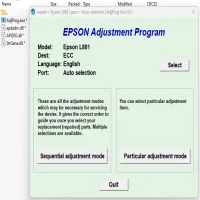
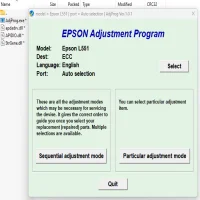
After installation, open the Epson L801 Adjustment Program. The interface should allow you to select the type of reset or adjustment you wish to perform.
Step 5: Select the Necessary Function
The software offers multiple functions depending on your needs. Common tasks include:
- Waste Ink Pad Counter Reset: To clear the “Waste Ink Pad Full” error.
- Head Cleaning: To remove clogged print heads.
- Printer Reset: To reset all printer settings to default.
- Service Mode: To enter deeper service functions for advanced users.
Choose the option that best addresses the issue you're facing.
Step 6: Perform the Reset or Adjustment
Once you’ve selected the desired action, click “Start” or “Reset”. The program will carry out the necessary procedure automatically. Be patient, as this might take a few minutes.
Step 7: Restart the Printer
After the program completes, turn off your printer, wait a few seconds, and then turn it back on. Your Epson L801 should be reset, and any errors or warnings should be cleared.
Risks of Using the Epson L801 Adjustment Program
Although the Epson L801 Adjustment Program is a helpful tool, it’s essential to understand the risks:
-
Potential for Misuse: If used incorrectly, the program can reset critical settings, causing the printer to malfunction. It’s crucial to follow instructions carefully and understand what each option does.
-
Void Warranty: Using third-party adjustment programs may void your printer’s warranty, as these tools are not officially supported by Epson.
-
Possible Hardware Issues: Repeated use of the reset program could strain the printer’s internal components, particularly if waste ink is not handled properly. Overuse may also increase wear on internal parts.
-
Illegal Software: Some adjustment programs may be pirated versions. Downloading such versions can expose your computer to viruses, malware, or ransomware. Always ensure you're using legitimate software.
Conclusion
The Epson L801 Adjustment Program is an essential tool for maintaining the performance and longevity of your printer. By resetting waste ink counters, fixing common service errors, and keeping the printer in top shape, it ensures that your Epson L801 continues to produce high-quality prints. However, always use this tool with caution, and be aware of the potential risks involved. Regular maintenance and using the adjustment program responsibly can help you get the most out of your printer and avoid costly repairs.
Rate the App
User Reviews

Popular Apps








