

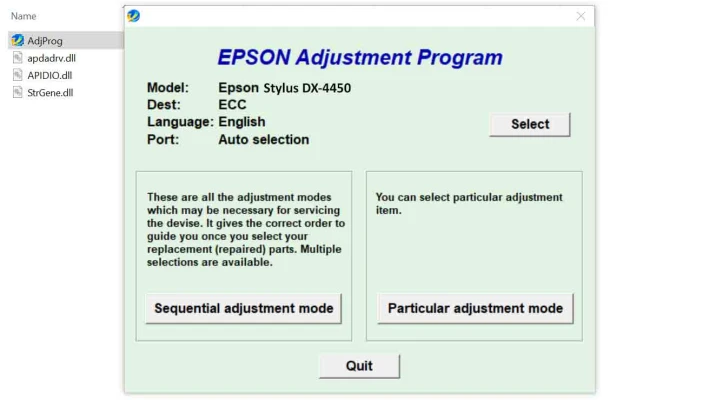
Latest Version
Download NowMore About EPSON STYLUS DX4450 Adjustment Program
EPSON STYLUS DX4450 Adjustment Program: A Comprehensive Guide
The EPSON Stylus DX4450 is a versatile inkjet printer that offers high-quality printing for both home and office use. However, like any printer, it may require periodic maintenance to ensure it operates smoothly and produces optimal results. One such maintenance tool is the "Adjustment Program," which allows users to reset, calibrate, and optimize their printer settings. This article explores the importance of the EPSON Stylus DX4450 Adjustment Program and how you can use it to keep your printer functioning efficiently.
What is the EPSON Stylus DX4450 Adjustment Program?
The EPSON Stylus DX4450 Adjustment Program is a software tool designed to help users reset and adjust the internal settings of their printer. It can fix a variety of issues that may arise during regular use, including problems related to the printer's waste ink pads, print head alignment, and ink cartridge usage.
This tool is particularly useful when the printer shows error messages, such as "Ink Pad is Full" or when users need to perform maintenance procedures that are not available through the regular printer menu.
Why Use the Adjustment Program?
-
Waste Ink Pad Reset: Over time, the waste ink pad in the printer can become full, leading to error messages and preventing the printer from functioning properly. The Adjustment Program allows users to reset the waste ink counter, essentially clearing the full pad status.
-
Print Head Alignment: Sometimes, the printer’s print head needs to be aligned to ensure that printouts are clear and sharp. The program helps users adjust the print head to the optimal position, improving print quality.
-
Ink Level Monitoring: The Adjustment Program provides tools for checking and resetting the ink levels, ensuring that the printer continues to operate efficiently without constant ink-related issues.
-
Diagnostic and Cleaning Tools: The program includes a set of diagnostic tools that can identify and resolve common issues such as clogged print heads or poor print quality. Regular use of these tools ensures that the printer performs at its best.
-
Cost Savings: By using the Adjustment Program to fix common issues yourself, you can save on repair costs and avoid unnecessary printer replacements.
How to Use the EPSON Stylus DX4450 Adjustment Program
While using the Adjustment Program may seem technical, it’s a relatively straightforward process when followed correctly. Here are the basic steps to get started:
1. Download and Install the Program
The first step is to download the EPSON Stylus DX4450 Adjustment Program from a trusted source. Be sure to choose the correct version that matches your printer model and operating system. After downloading, follow the installation instructions provided.
2. Connect Your Printer
Ensure that the EPSON Stylus DX4450 is connected to your computer via USB and powered on. The Adjustment Program will not work if the printer is not properly connected.
3. Launch the Adjustment Program
Once the software is installed, launch the program. The interface may appear complex, but there are typically clear options for the tasks you need to perform, such as resetting the waste ink counter or performing a print head alignment.
4. Select the Desired Function
From the main menu of the program, choose the function you need. Common options include:
- Waste Ink Pad Reset: To resolve the "ink pad full" error.
- Head Alignment: To improve print quality.
- Ink Level Reset: To reset ink level counters.
5. Follow On-Screen Instructions
The program will guide you through the necessary steps for the selected function. Follow the instructions carefully, as performing certain tasks incorrectly could lead to issues with the printer.
6. Restart Your Printer
After completing the adjustment process, restart your printer to ensure the changes take effect.
Potential Risks and Warnings
Although the EPSON Stylus DX4450 Adjustment Program is a valuable tool for maintenance, it’s important to note the potential risks involved:
-
Incorrect Usage: Using the program incorrectly, especially with tasks like resetting waste ink counters, could lead to further damage to the printer. Always read the instructions carefully and ensure that you're following the steps for your specific printer model.
-
Limited Support: EPSON doesn’t officially support the Adjustment Program, as it is typically used for more advanced maintenance tasks. Users should proceed with caution and understand that they may void warranties if the program is used improperly.
-
Download from Trusted Sources: Be sure to download the Adjustment Program from legitimate sources. Using unreliable websites could result in downloading malicious software that could harm your computer or printer.
Conclusion
The EPSON Stylus DX4450 Adjustment Program is an essential tool for anyone looking to maintain their printer and solve common operational issues. Whether you're dealing with waste ink pad errors, alignment problems, or general maintenance needs, the program offers a straightforward solution. However, it’s essential to use the tool with care and only when necessary to avoid potential risks. By understanding how the Adjustment Program works and following the correct procedures, you can extend the lifespan of your printer and keep it running smoothly for years to come.
Rate the App
User Reviews





Popular Apps








