

Latest Version
Download NowMore About Epson Stylus C44UX Adjustment Program
Epson Stylus C44UX Adjustment Program: A Comprehensive Guide
The Epson Stylus C44UX is a reliable inkjet printer popular for both home and office use. However, like any printer, it may require occasional adjustments to maintain its optimal performance. The Epson Stylus C44UX Adjustment Program is a specialized tool that allows users to reset the printer, clean the print heads, and perform other necessary maintenance tasks to keep the printer in top shape. In this article, we will delve into the features and benefits of the Epson Stylus C44UX Adjustment Program, as well as the steps to use it effectively.
What is the Epson Stylus C44UX Adjustment Program?
The Epson Stylus C44UX Adjustment Program is a software utility developed by Epson to help users manage and maintain their printers. It allows you to perform a variety of essential functions, including resetting ink counters, adjusting print head alignment, and resolving issues related to ink overflow. The program is particularly useful for users who want to avoid costly repairs or replacements by handling minor issues themselves.
This program is not typically included in the standard printer driver installation, but it can be obtained from third-party websites or Epson service centers. It's important to download the program from reliable sources to ensure that it is safe and free from malware.
Key Features of the Epson Stylus C44UX Adjustment Program
-
Ink Waste Counter Reset: Over time, the printer accumulates ink waste in the form of excess ink that is ejected during cleaning cycles. If the waste ink tank becomes full, it can cause the printer to stop working. The Epson Adjustment Program allows users to reset the waste ink counter, preventing unnecessary service interruptions.
-
Print Head Cleaning: A clogged print head is one of the most common problems faced by inkjet printer users. This program allows users to clean the print heads, improving print quality and preventing ink smears and blurring.
-
Print Head Alignment: To ensure that the printed images and text are sharp and clear, proper alignment of the print head is essential. The adjustment program helps users perform head alignment to maintain the quality of their printouts.
-
Change Ink Cartridge Monitoring: The Epson Stylus C44UX uses ink cartridges that need to be replaced when the ink levels are low. The adjustment program helps users monitor the ink levels and alerts them when it's time for a cartridge change.
-
Restoring Default Settings: If the printer starts exhibiting abnormal behavior due to misconfigurations or software glitches, the adjustment program can restore the printer to its factory settings. This can help resolve a variety of technical issues without the need for professional repair services.
How to Use the Epson Stylus C44UX Adjustment Program
Step 1: Download and Install the Program First, you need to download the Epson Stylus C44UX Adjustment Program. Make sure to choose a trustworthy source to avoid downloading malware. Once downloaded, extract the program and run the installer.
Step 2: Connect the Printer Ensure that your Epson Stylus C44UX printer is connected to your computer and powered on. The program will only work when the printer is detected by the system.
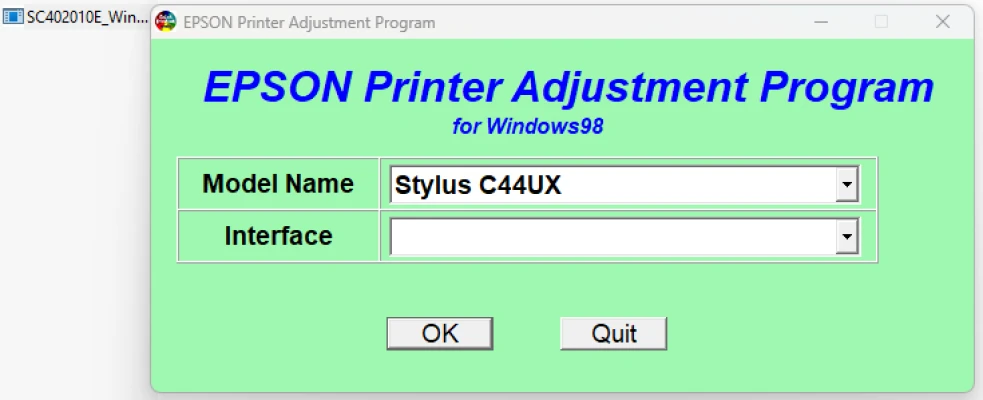
Step 3: Run the Adjustment Program After installing the program, launch it. The interface may appear in a simple window, with a series of options listed. Select the function you need to perform, such as “Waste Ink Counter Reset,” “Print Head Cleaning,” or “Print Head Alignment.”
Step 4: Follow On-Screen Instructions The program will guide you through the necessary steps for each selected function. For example, if you choose “Print Head Cleaning,” it will prompt you to follow instructions that include test printing to check for clogs.
Step 5: Save Your Settings Once the necessary adjustments are made, make sure to save your settings and exit the program. This will ensure that the changes are applied to your printer.
Benefits of Using the Epson Stylus C44UX Adjustment Program
-
Cost-Effective Maintenance: By using this adjustment program, you can handle many maintenance tasks without having to call a professional technician. This can save you significant repair costs.
-
Improved Printer Lifespan: Regular maintenance helps keep the printer in good working condition, preventing long-term damage and reducing the risk of malfunction.
-
Better Print Quality: With options like print head cleaning and alignment, the adjustment program can help you maintain excellent print quality, preventing issues such as faded colors, lines, or blurred text.
-
Convenience: The program provides a convenient way to resolve printer issues without leaving your home or office, which is especially useful for users who depend on their printer for daily tasks.
Conclusion
The Epson Stylus C44UX Adjustment Program is a valuable tool for users looking to maintain their printer’s performance and quality. By performing simple tasks like cleaning the print head, resetting ink counters, and aligning the print head, you can significantly extend the lifespan of your printer and improve its functionality. While the adjustment program can be a bit technical for beginners, following the step-by-step instructions ensures smooth operation. As always, make sure to download the program from a trusted source to avoid any potential security risks.
Rate the App
User Reviews


Popular Apps








