

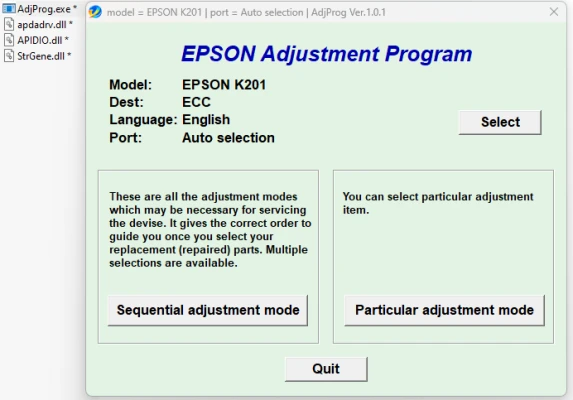
Latest Version
Download NowMore About Epson K201 Adjustment Program
Epson K201 Adjustment Program: A Complete Guide
The Epson K201 is a reliable and versatile printer, offering efficient performance for home and office use. However, like any other printer, it requires regular maintenance and sometimes needs adjustments to ensure optimal printing quality. One of the essential tools for maintaining your Epson K201 printer is the Epson K201 Adjustment Program.
What is the Epson K201 Adjustment Program?
The Epson K201 Adjustment Program is a diagnostic and maintenance tool designed to help users perform various functions that restore their printer to its best working condition. The program provides a simple interface for users to perform a range of adjustments, from fixing print quality issues to resolving hardware malfunctions.
Key Features of the Epson K201 Adjustment Program
-
Waste Ink Pad Reset:Over time, the printer’s waste ink pad accumulates ink during the printing process. When this pad is full, it can cause the printer to stop working and display error messages. The Epson K201 Adjustment Program allows users to reset the waste ink counter, so the printer continues to operate smoothly.
-
Head Cleaning and Alignment:Printer heads can become clogged due to ink build-up or irregular use. The adjustment program includes functions for head cleaning, which helps clear any blockages and ensures crisp, high-quality prints. It also includes head alignment, a key feature for optimizing the printer's output.
-
Ink Cartridge and Sensor Adjustments:In addition to cleaning, the program also helps calibrate ink cartridges and sensors. These adjustments ensure that the printer detects the correct ink levels, minimizing the chances of errors or poor print quality.
-
Firmware Updates:The program helps users update the printer’s firmware, which can improve performance and fix bugs or glitches that may have arisen in previous versions. Keeping your printer’s firmware up to date ensures that the printer continues to work with the latest features and enhancements.
-
Error Code Reset:When the printer experiences a malfunction, it may display specific error codes. The Epson K201 Adjustment Program allows users to clear these error codes, enabling the printer to return to normal operation without needing professional repairs.
-
Printer Configuration Adjustments:The program also allows users to adjust specific printer settings, such as paper size, print quality, and speed, according to their preferences. This level of customization can help users save on ink costs while maintaining high-quality output.
How to Use the Epson K201 Adjustment Program
Using the Epson K201 Adjustment Program is relatively straightforward, but it does require some technical know-how. Follow these steps to run the program:
-
Download the Program:First, you will need to download the Epson K201 Adjustment Program. Ensure that you download it from a trusted and secure source to avoid malware or corrupted files.
-
Install the Program:After downloading, extract the files and install the program on your computer. Make sure your Epson K201 printer is connected to your computer.
-
Run the Program:Launch the Epson K201 Adjustment Program and select the maintenance or adjustment option you need. The program will prompt you through a series of steps to perform specific functions such as resetting the waste ink counter or cleaning the print head.
-
Follow the Instructions:The program will guide you through each step. Be sure to follow the instructions carefully, as incorrect usage can lead to unintended consequences.
-
Complete the Adjustments:Once the adjustments are complete, restart your printer to ensure that the settings take effect. You can now test your printer with a test page to confirm that the issue has been resolved.
Why Should You Use the Epson K201 Adjustment Program?
The Epson K201 Adjustment Program is essential for users who want to maintain the printer’s performance and avoid costly repairs. Here are some reasons why this tool is indispensable:
- Cost-Effective Maintenance: Using the adjustment program helps you resolve minor issues without the need for professional servicing, saving money in the long run.
- Extended Printer Life: Regular maintenance ensures that the printer operates optimally, helping to extend its life and prevent breakdowns.
- Improved Print Quality: The program helps fix issues like clogged print heads and misaligned cartridges, resulting in cleaner, sharper prints.
- Convenience: The adjustment program offers an easy-to-use interface, making it accessible even to users with limited technical experience.
Caution and Precautions
While the Epson K201 Adjustment Program can be incredibly helpful, users should take caution when using it. Incorrect adjustments or multiple resets can lead to issues such as ink leakage or hardware damage. Always follow the program's instructions carefully, and if you're unsure, it may be wise to consult a professional technician.
Additionally, be aware that the program might not be officially supported by Epson, so using it might void any warranties you have on your printer.
Conclusion
The Epson K201 Adjustment Program is an indispensable tool for anyone looking to maintain the performance of their Epson K201 printer. With its various features, including waste ink pad resets, head cleaning, and sensor calibration, it helps users save time and money while improving print quality. However, it’s crucial to use the program responsibly to avoid causing any harm to the printer. Regular maintenance with the adjustment program will keep your printer running smoothly for years to come.
Rate the App
User Reviews


Popular Apps








