How to Set Up a Smart Home in 2025
Discover how to set up a smart home in 2025. Learn about the best devices, technologies, and steps for creating a connected and efficient home environment. January 19, 2025 19:43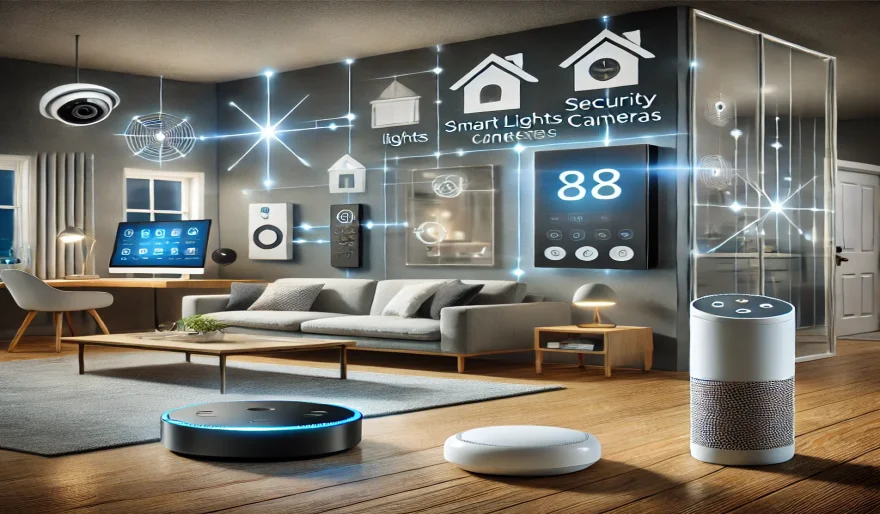
In recent years, smart home technology has revolutionized the way we live, providing us with greater convenience, security, and energy efficiency. With advancements in artificial intelligence (AI), Internet of Things (IoT), and voice assistants, creating a smart home is easier than ever before. In 2025, the options for automating and controlling your home are more diverse and sophisticated, offering seamless integration across various devices.
Whether you’re looking to enhance security, control lighting, or optimize energy usage, this comprehensive guide will show you how to set up a smart home in 2025. We will cover everything from selecting the right devices to connecting them for smooth operation, ensuring your home is both smart and efficient.
1. What is a Smart Home?
A smart home is a residence equipped with devices that can be controlled and monitored remotely through the internet or a local network. These devices typically use IoT technology to communicate with each other, allowing homeowners to automate tasks like adjusting thermostats, locking doors, and managing lighting from a smartphone, tablet, or voice assistant.
In 2025, smart home technology has evolved to include AI-driven systems that learn your habits, making your home smarter over time. Whether you’re managing security, entertainment, or daily chores, a smart home can make life easier, more convenient, and energy-efficient.
2. Essential Components for Setting Up a Smart Home in 2025
Setting up a smart home requires a variety of devices that work together seamlessly. Below are the key components you'll need to get started:
1. Smart Hub
A smart hub acts as the central controller for all your connected devices. It enables communication between different devices, such as lights, locks, and thermostats, allowing them to work together.
- Top picks: Amazon Echo, Google Nest Hub, Apple HomePod.
- Features to consider: Voice control, compatibility with other smart devices, and ease of setup.
2. Smart Thermostat
A smart thermostat helps you manage your home’s heating and cooling systems more efficiently. These devices learn your preferences and adjust the temperature automatically, ensuring optimal comfort while reducing energy consumption.
- Top picks: Nest Learning Thermostat, Ecobee Smart Thermostat, Honeywell Home T9.
- Features to consider: Remote control, energy-saving features, compatibility with AI assistants.
3. Smart Lighting
Smart lighting allows you to control your lights from anywhere, adjust brightness, and even change colors. These systems also work with motion sensors and timers, creating ambiance and reducing energy usage.
- Top picks: Philips Hue, LIFX Smart Bulbs, Wyze Bulb.
- Features to consider: Compatibility with voice assistants, color options, and scheduling features.
4. Smart Security Systems
A smart security system provides peace of mind by allowing you to monitor your home remotely, control locks, and receive alerts in case of suspicious activity. Cameras, doorbell systems, and motion sensors are key components of a smart security system.
- Top picks: Ring Doorbell, Nest Cam, Arlo Pro, SimpliSafe.
- Features to consider: Video quality, cloud storage, integration with home automation systems.
5. Smart Appliances
From refrigerators to washing machines, smart appliances are designed to enhance convenience and improve energy efficiency. These devices can be controlled remotely or programmed to operate on specific schedules, helping you save time and reduce utility bills.
- Top picks: Samsung Smart Fridge, LG Smart Washer, iRobot Roomba.
- Features to consider: Remote control, energy efficiency, and integration with other smart devices.
6. Smart Speakers and Voice Assistants
Voice assistants like Amazon Alexa, Google Assistant, and Apple Siri are integral to a smart home setup. These devices let you control everything from lights to thermostats and security systems with just your voice.
- Top picks: Amazon Echo, Google Nest Mini, Apple HomePod.
- Features to consider: Integration with other devices, voice recognition, and multi-room support.
7. Smart Plugs and Outlets
Smart plugs allow you to turn any appliance into a smart device. These are especially useful for controlling lights, fans, or other small appliances that don’t come with built-in smart functionality.
- Top picks: TP-Link Kasa Smart Plug, Wemo Mini Smart Plug, Meross Smart Plug.
- Features to consider: Scheduling, energy monitoring, and app control.
3. Steps to Set Up Your Smart Home
Now that you know the essential components, here are the steps to create your smart home in 2025:
Step 1: Plan Your Smart Home Setup
Before purchasing devices, assess your needs and plan the layout of your smart home. Consider factors like:
- Rooms to automate: Which areas of the home need smart devices (e.g., living room, kitchen, bedroom)?
- Devices to prioritize: Decide which smart devices will provide the most benefit (e.g., security cameras, thermostat, lights).
- Compatibility: Ensure all devices are compatible with your chosen smart hub or assistant.
Step 2: Install the Smart Hub
Start by setting up your smart hub. This will act as the center for controlling and monitoring all your devices. Follow the manufacturer’s instructions for setup, usually via a smartphone app.
Step 3: Add Smart Devices
Begin adding your smart devices, such as lights, thermostats, and cameras, to the hub or voice assistant. Most devices will guide you through the pairing process in their respective apps.
- Connect devices to Wi-Fi or Bluetooth.
- Customize settings like schedules, temperature ranges, and modes.
Step 4: Integrate and Automate
Once your devices are set up, start integrating them with one another. For example, set up your smart thermostat to adjust the temperature when you leave home or connect your security cameras to send alerts if motion is detected.
- Create automation routines: Set up actions that occur based on triggers, such as turning off lights when you leave the house.
- Link to voice assistants: Enable voice commands for hands-free control.
Step 5: Test and Optimize
After your setup is complete, test each device to ensure it works as expected. Fine-tune automation settings and voice commands for a smooth and efficient smart home experience.
4. The Benefits of a Smart Home in 2025
- Increased Convenience: Control devices remotely and automate everyday tasks like lighting, security, and temperature management.
- Energy Efficiency: Smart thermostats and lighting systems can save energy by adjusting settings based on your habits and schedules.
- Enhanced Security: Monitor your home from anywhere and receive instant alerts in case of suspicious activity.
- Improved Lifestyle: Voice assistants and smart appliances simplify daily routines, making your home more comfortable and user-friendly.
5. FAQs About Setting Up a Smart Home
Q1: What is the best smart home hub?
The best smart home hub depends on your ecosystem. For Amazon Alexa devices, the Amazon Echo is an excellent choice. For Google users, Google Nest Hub works seamlessly. If you're invested in Apple's ecosystem, Apple HomePod is ideal.
Q2: Can I set up a smart home on a budget?
Yes, you can start with basic devices like smart plugs and bulbs. Gradually add more advanced items like security cameras or thermostats as your budget allows.
Q3: How secure are smart home devices?
Smart home devices are generally secure, but it’s important to follow best practices for security, such as using strong passwords, enabling two-factor authentication, and regularly updating device software.
Q4: Can I control my smart home remotely?
Yes, most smart home devices allow you to control them remotely using mobile apps. This gives you the ability to monitor and adjust your home’s settings even when you’re not there.
Q5: Are smart homes energy-efficient?
Yes, smart homes are designed to optimize energy use. Devices like smart thermostats and lighting can help reduce energy consumption by adjusting settings based on your preferences.
Conclusion
Setting up a smart home in 2025 can significantly improve the comfort, security, and efficiency of your living space. With the right devices and careful planning, you can automate tasks, control your environment remotely, and optimize your home’s energy usage. The future of smart homes is here, and with this guide, you're well on your way to creating a connected, intelligent home that fits your needs.
User Comments (0)
Popular Apps