

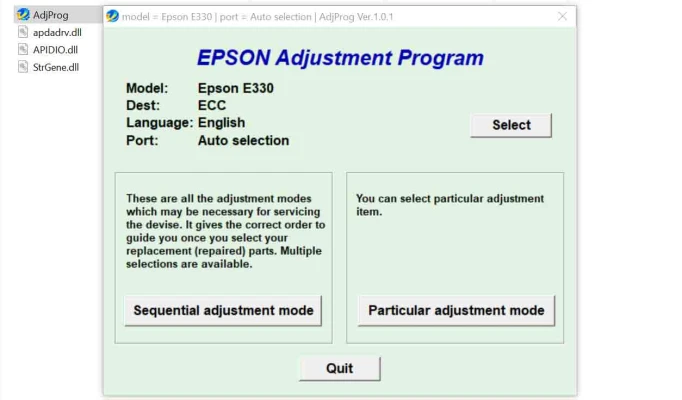
Latest Version
More About Epson E-330 Adjustment Program
Epson E-330 Adjustment Program: A Comprehensive Guide to Unlocking Printer Potential
The Epson E-330 series printers are among the most versatile and reliable devices for home and office use. However, like any advanced technology, they require regular maintenance to operate at peak performance. Enter the Epson E-330 Adjustment Program—a powerful tool designed to address printer errors, optimize performance, and prolong the device's lifespan.
This article dives deep into the adjustment program, explaining its purpose, features, and how to use it safely and effectively.
What is the Epson E-330 Adjustment Program?
The Epson E-330 Adjustment Program is a specialized software utility developed to diagnose and resolve printer issues beyond the capabilities of basic troubleshooting methods. It grants users access to advanced printer settings, allowing adjustments and resets to ensure smooth operation.
Key Features of the Adjustment Program
- Waste Ink Pad Counter ResetOne of the most common issues in Epson printers is the “service required” error caused by a full waste ink pad counter. The adjustment program resets this counter, restoring functionality and eliminating unnecessary service calls.
- Head Cleaning and AlignmentThe program facilitates advanced cleaning cycles and nozzle alignment, ensuring high-quality prints and reducing the need for hardware interventions.
- EEPROM AdjustmentModify EEPROM (Electrically Erasable Programmable Read-Only Memory) settings for precise control over internal printer parameters.
- Ink Charge ManagementThe program allows users to manage ink flow and charging, optimizing ink consumption and enhancing efficiency.
- Custom Paper Size AdjustmentTailor your printer’s paper handling to specific needs by configuring custom paper sizes and margins.
Why Use the Epson E-330 Adjustment Program?
How to Use the Epson E-330 Adjustment Program
Step 1: Download and Install
- Obtain the program from a trusted source. Ensure compatibility with your operating system and printer model.
- Disable antivirus temporarily, as some security software may mistakenly flag the program.
Step 2: Connect Your Printer
- Connect the Epson E-330 to your computer using a USB cable. Ensure the printer is powered on and recognized by the system.
Step 3: Launch the Program
- Open the adjustment program and select the Epson E-330 model from the list.
Step 4: Perform Maintenance
- Navigate through the program menu to access specific functions such as resetting the waste ink counter, running head cleaning cycles, or adjusting paper feed settings.
Step 5: Save and Test
- Save your changes and test the printer to confirm that the adjustments were successful.
Precautions When Using the Program
- Ensure Proper UnderstandingIncorrect usage of advanced settings can harm the printer. Always follow instructions carefully.
- Backup EEPROM DataBefore making changes, backup the printer’s EEPROM data to avoid irreversible modifications.
- Use Genuine Ink and SuppliesFor best results, pair the adjustment program with genuine Epson inks and compatible paper.
- Check Software LegalityDownload the program only from authorized sources to avoid counterfeit or malicious software.
Final Thoughts
The Epson E-330 Adjustment Program is a must-have tool for anyone looking to maximize the performance and lifespan of their Epson printer. With its advanced features and user-friendly interface, it empowers users to address issues that would otherwise require professional intervention. However, caution and responsibility are essential to avoid unintended consequences.
Embrace the power of the Epson E-330 Adjustment Program, and enjoy a seamless, efficient, and long-lasting printing experience!
Rate the App
User Reviews
Other Apps in This Category


Popular Apps








