

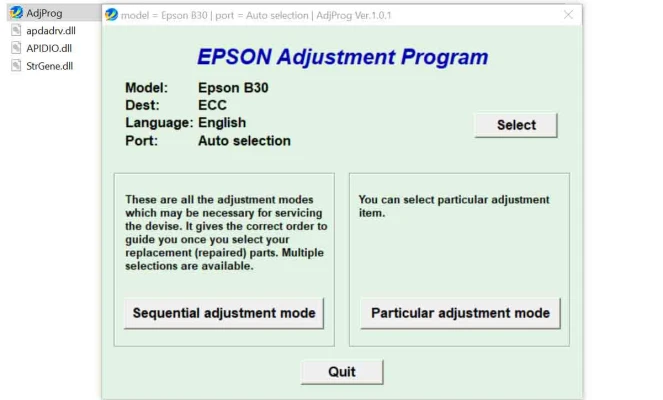
Latest Version
More About Epson B-30 Adjustment Program
Epson B-30 Adjustment Program: A Comprehensive Guide
The Epson B-30 is a compact, high-performance business inkjet printer that delivers excellent print quality, making it an ideal choice for small businesses and home offices. However, like any piece of technology, it may require occasional adjustments to maintain peak performance. The Epson B-30 Adjustment Program is a vital tool designed for technicians, service centers, and advanced users who wish to perform maintenance and fine-tune the printer to ensure its longevity and optimal operation. This article explores the key features and usage of the Epson B-30 Adjustment Program.
What is the Epson B-30 Adjustment Program?
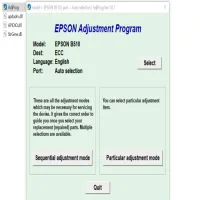
The Epson B-30 Adjustment Program is a specialized software developed by Epson to aid in the maintenance and repair of the Epson B-30 printer. It allows users to perform functions like resetting the printer’s waste ink counter, aligning print heads, and correcting print quality issues. In essence, it acts as an essential tool for troubleshooting and restoring a printer's functionality when it starts to malfunction or show signs of wear.
Key Features of the Epson B-30 Adjustment Program
Waste Ink Counter Reset: One of the most common problems with inkjet printers is the waste ink counter overflow, which occurs when the printer’s internal waste ink reservoir is full. The Epson B-30 Adjustment Program allows users to reset this counter, preventing the printer from stopping unnecessarily due to this issue.
Print Head Alignment: Over time, print heads may become misaligned, leading to poor print quality, such as faded prints or uneven ink distribution. The program allows users to realign the print heads, ensuring that the printer delivers sharp and clear prints.
Cleaning and Maintenance: The software provides options for cleaning the print heads and performing maintenance cycles to keep the ink delivery system running smoothly. This ensures that the printer operates efficiently and reduces the risk of clogging.
Firmware Updates: While not a primary function of the Adjustment Program, it can also help in updating the printer’s firmware, ensuring the printer stays up-to-date with any new features or bug fixes released by Epson.
Error Troubleshooting: The program helps diagnose various issues the printer might encounter. It assists in pinpointing the problem and suggesting corrective actions to restore functionality.
How to Use the Epson B-30 Adjustment Program
Using the Epson B-30 Adjustment Program is relatively straightforward but requires a careful approach. Below are the general steps to follow:
Download and Install the Software:
- The Epson B-30 Adjustment Program is not readily available through Epson’s official website, but it can be sourced from third-party websites that specialize in printer service tools. Ensure you download it from a reliable source to avoid malware or counterfeit software.
- Once downloaded, install the software by following the on-screen instructions. The software is typically available for both Windows and Mac operating systems.
Connect the Printer:
- Ensure that the Epson B-30 is properly connected to the computer via USB and that the printer is powered on.
Launch the Program:
- Open the Epson B-30 Adjustment Program from your desktop or program menu. You may be asked to enter administrator permissions to proceed with some of the functions.
Select the Desired Function:
- Once the program is open, select the maintenance task you need to perform. Whether it’s a waste ink reset, print head alignment, or cleaning cycle, click on the appropriate option.
Perform the Adjustment:
- Follow the instructions provided by the software. During this process, ensure the printer is not interrupted and has sufficient ink levels to avoid errors.
Verify the Results:
- After completing the adjustments, test the printer to ensure the issue has been resolved. Perform a test print to check if the alignment, print quality, and overall performance have improved.
Important Considerations and Cautions
Backup Important Data: Before using the Adjustment Program, make sure to back up any important data or settings. Although the program is generally safe to use, it’s always a good idea to take precautions.
Software Compatibility: Ensure that the Adjustment Program is compatible with your operating system. Some versions may work only with specific versions of Windows or macOS.
Warranty: Using the Epson B-30 Adjustment Program may void your warranty if it's not officially authorized by Epson. It’s recommended to check the warranty terms before proceeding with any adjustments.
Correct Usage: The program provides powerful tools, but improper use can lead to further issues with your printer. Always follow instructions carefully and avoid excessive use of cleaning cycles, as this can waste ink and cause unnecessary wear.
Conclusion
The Epson B-30 Adjustment Program is an invaluable tool for anyone looking to maintain or repair their Epson B-30 printer. It provides essential functions like waste ink reset, print head alignment, and error troubleshooting. While it offers a convenient solution for common printer issues, users should be mindful of proper use and ensure compatibility with their systems. Regular maintenance with this software can significantly extend the life of your Epson B-30 and help maintain consistent, high-quality prints.
Rate the App
User Reviews


Popular Apps








